Getting Started
After installation, the app is available in all projects. See the Administrators Guide on how to enable the app on specific projects. When you open the app in a project, it shows the overview screen, where you can add and manage story maps.
Story maps “live” in projects - however, this does not mean that they are limited in this way. You can add issues from any project and configure boards with multiple projects as backlogs for the story map.
Adding a new story map
You can create a new story map from the overview screen or the map switcher at the top of the app.
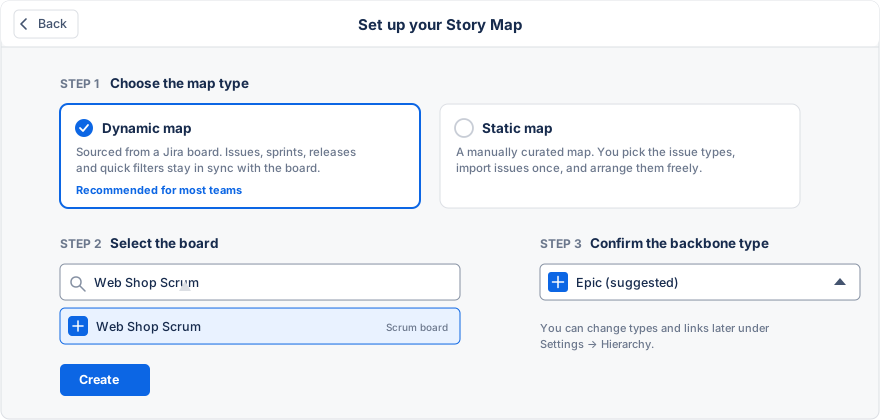
You can select between a dynamic and a static map. Read more about the differences between these two map types here. In most cases, we now recommend going with dynamic maps.
After choosing the dynamic map type, you select your Jira agile board and confirm the issue type for the backbone. The app suggests the project’s epic type. You can change the hierarchy later under Settings → Hierarchy.
If you choose a static map, the welcome assistant opens, where you can specify a name for the story map. You then define which issue type to use for the backbone of the story map. See our best practice guide that describes the structure of a user story map. If you leave this field empty, the map will either (a) pick the standard epic issue type or (b) ask again when opening the map if the standard epic type is not available in your project.
Lastly, you can select an agile board to use as a backlog. This step is optional. You can either pick a board later or add the issues manually to the story map if you do not want to use Jira Software features or only have a Jira Core license.
Importing Issues
The welcome assistant for static maps automatically lets you import issues with the selected issue type from the current project or - if you have chosen one - from the agile board.
For example, the app will import existing epics and all issues within those epics into the story map. Please beware that managing the same issues from multiple story maps is discouraged because it can confuse your teammates if they observe changes to their story maps without their actions.