Plan Sprints and Releases
Swimlanes cut the map into horizontal delivery slices. The issues stay in their columns — what a lane changes is when the work happens. Switch views with the view switcher in the toolbar: Sprints for iteration planning, Releases for version planning.
Plan a sprint
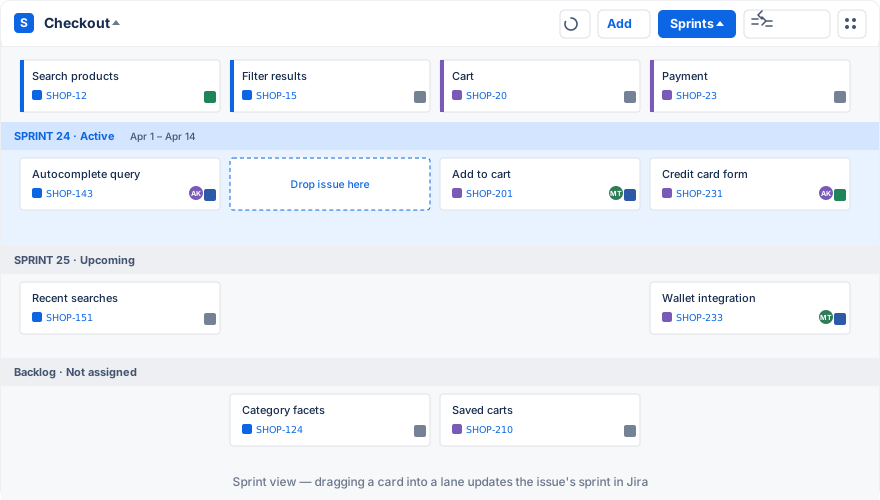
- Switch the view to Sprints. The map shows one lane per sprint, with the active sprint first and a backlog lane at the bottom for unassigned work.
- Read the active sprint left to right. Each column is one step of the journey, so a sprint that is strong in one column and empty in the next shows up immediately.
- Drag issues between lanes to assign them. Dropping a card into a sprint writes that sprint to the issue’s sprint field in Jira.
- Repeat until the sprint tells a coherent story rather than filling capacity.
You can also create a sprint from the map: switch to Sprints, then use Add → Add Sprint. The sprint is created on the map’s board.
The sprint controls follow the sprint’s state. When the team finishes, complete the sprint from the map like you would on the board. Moving an issue back to the backlog lane clears its sprint field.
Plan a release
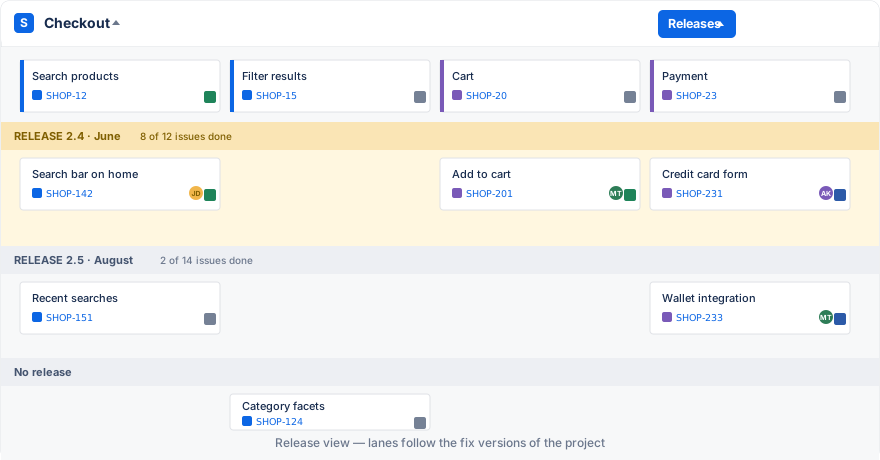
Switch the view to Releases. Lanes follow the fix versions of the project, newest first by default. Drag issues into the version that should ship them, or create a version with Add → Add Release.
Jira versions belong to a project, so an issue can only be assigned to a version of its own project. If you need to plan releases across several projects, that is what Advanced Story Maps and its custom-field swimlanes are for.
When a lane is missing
- Release lanes require the Releases feature in project settings. Enable it under Project settings → Features.
- Sprint lanes require a scrum board. Kanban boards only offer release lanes.
- If the app shows a warning next to the Settings button, no board is configured for the map. Sprint and release views need one; set it under Settings → General.
See Common Issues & Questions for permission problems, such as sprints on boards that span projects.